Unified lightbox component
Overview
The myEDITED platform is built around several core modules, each requiring a lightbox to display images. Because each module had unique requirements, each lightbox was built independently; its own layout, its own actions, its own codebase. Simple updates had to be made across five separate codebases, multiplying maintenance time and cost. I led the design of a unified lightbox component that works across every feature on the platform, reducing maintenance time and cost by 80% while delivering a consistent experience to users.
Problem
Five separate lightbox codebases made every fix, every change, and every extension 5x longer and expensive, and still left users with an inconsistent experience.
Engineering cost was compounding
Each lightbox had its own codebase. A fix to shared behaviour had to be made in five places, across five PRs, reviewed and tested five times. The maintenance burden scaled linearly with every feature that needed a lightbox. Engineers flagged this as an ongoing source of friction.
User experience was quietly inconsistent
Depending on which feature the user was in, some shared action buttons were placed in different locations, and required different amounts of contextual information. Although no single interaction was broken, the accumulated inconsistency meant the platform felt less coherent than it should.
Additional metadata needed to be shown
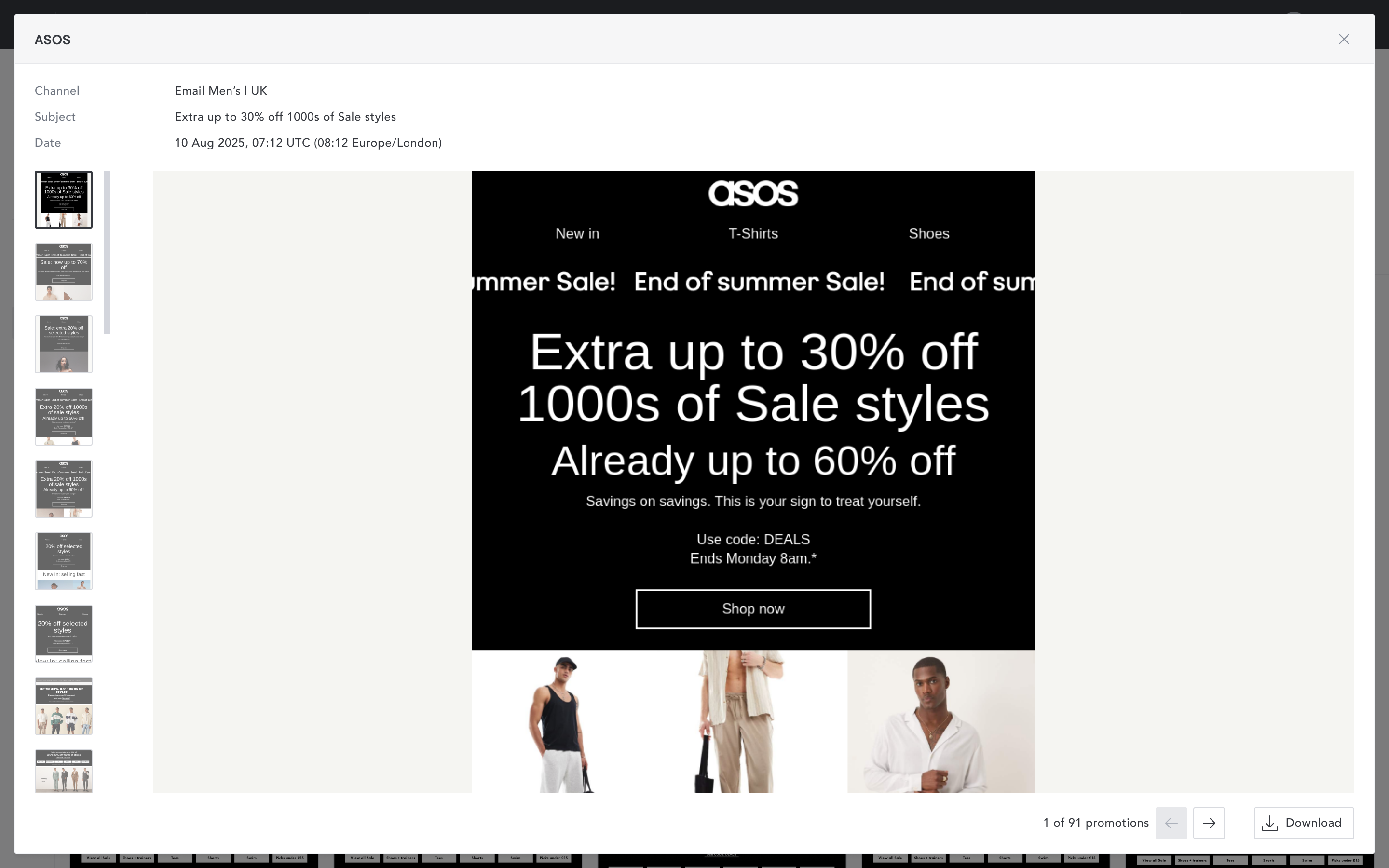
The competitive promotion lightbox only showed three metadata fields. The product team needed it to show significantly more. Adding them to the existing inline layout wasn’t viable as it would reduce the image size.
To illustrate the inconsistency:
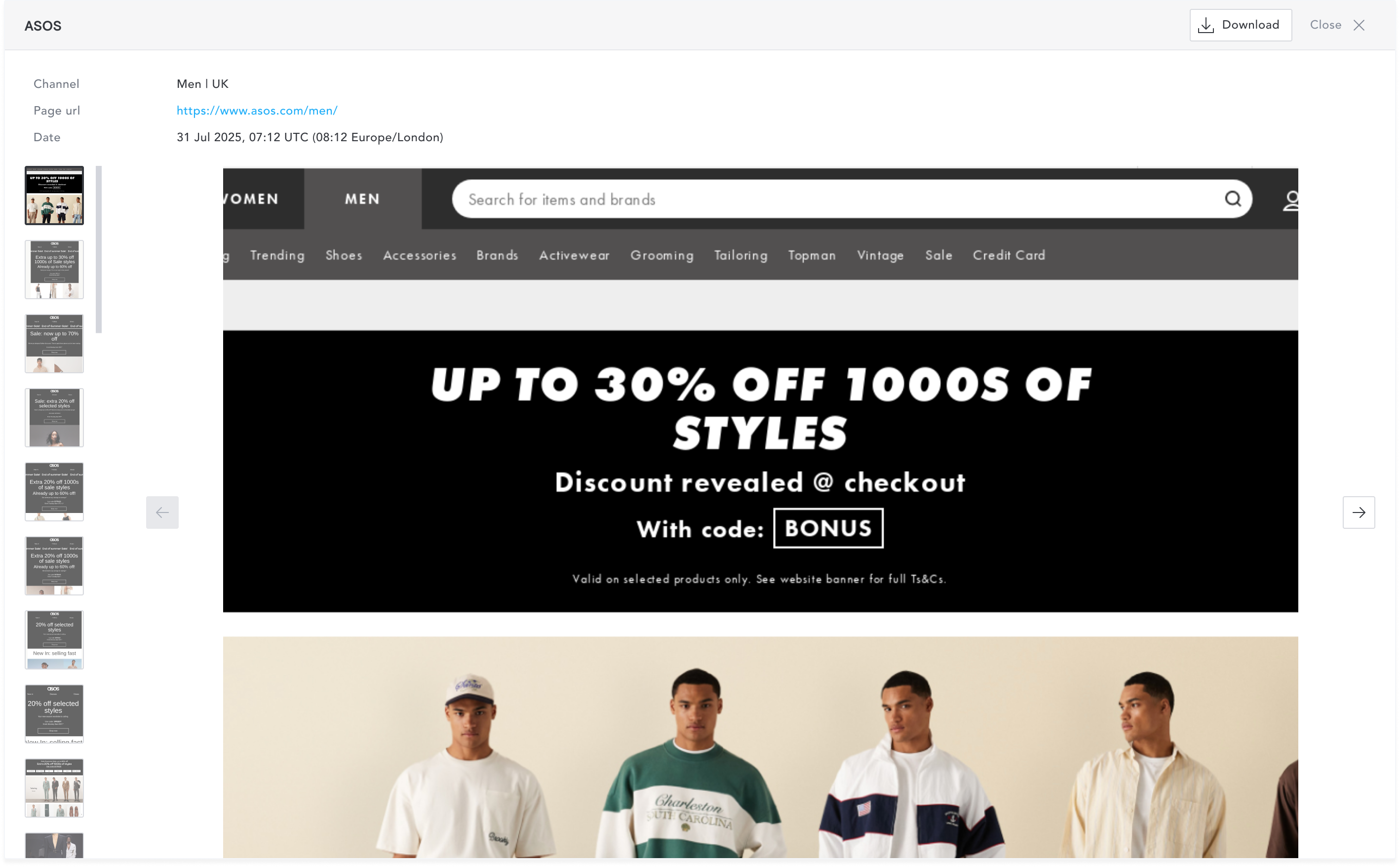
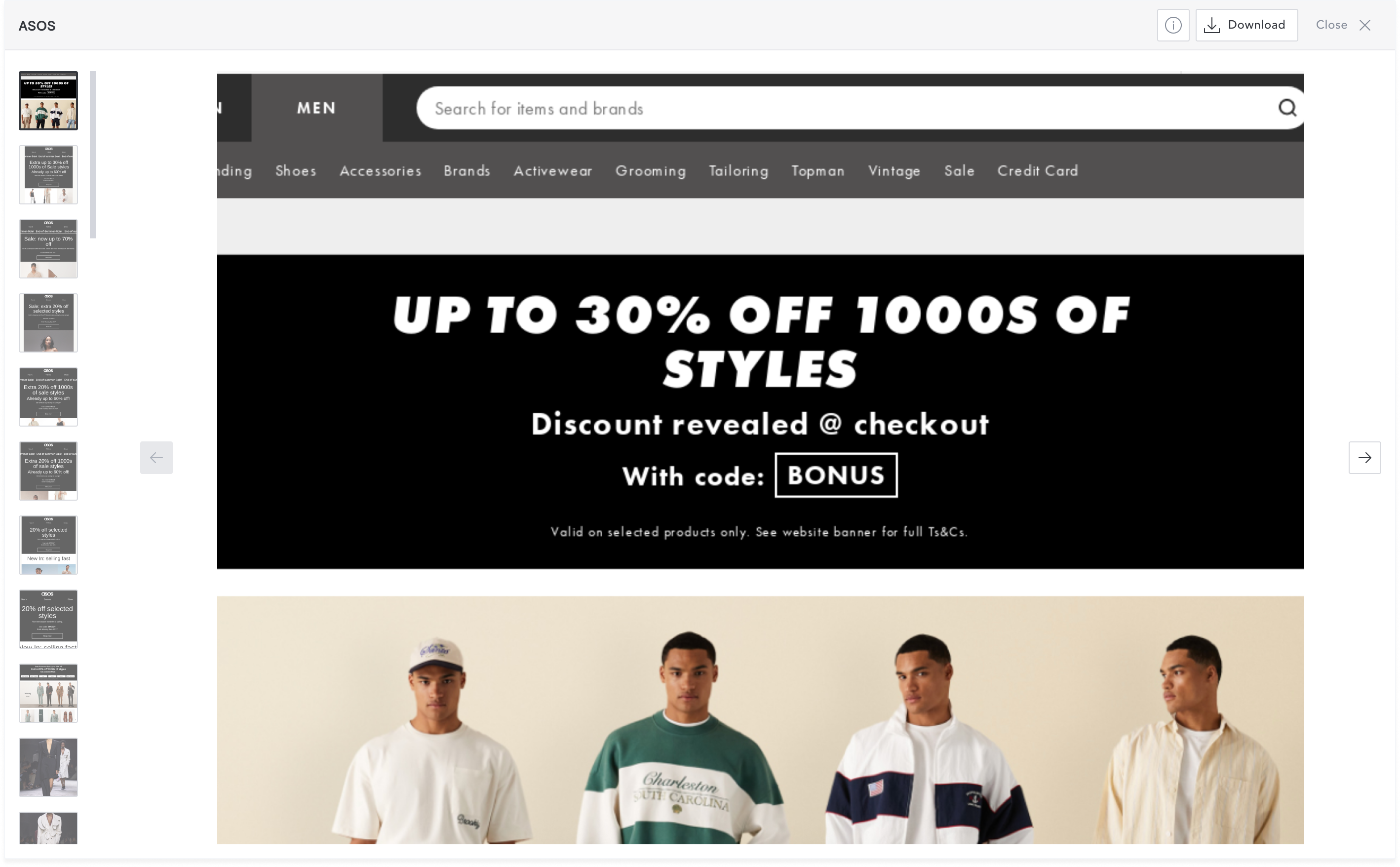
Competitive promotions lightbox shows some metadata above the image container and has the action and scroll buttons in the footer.
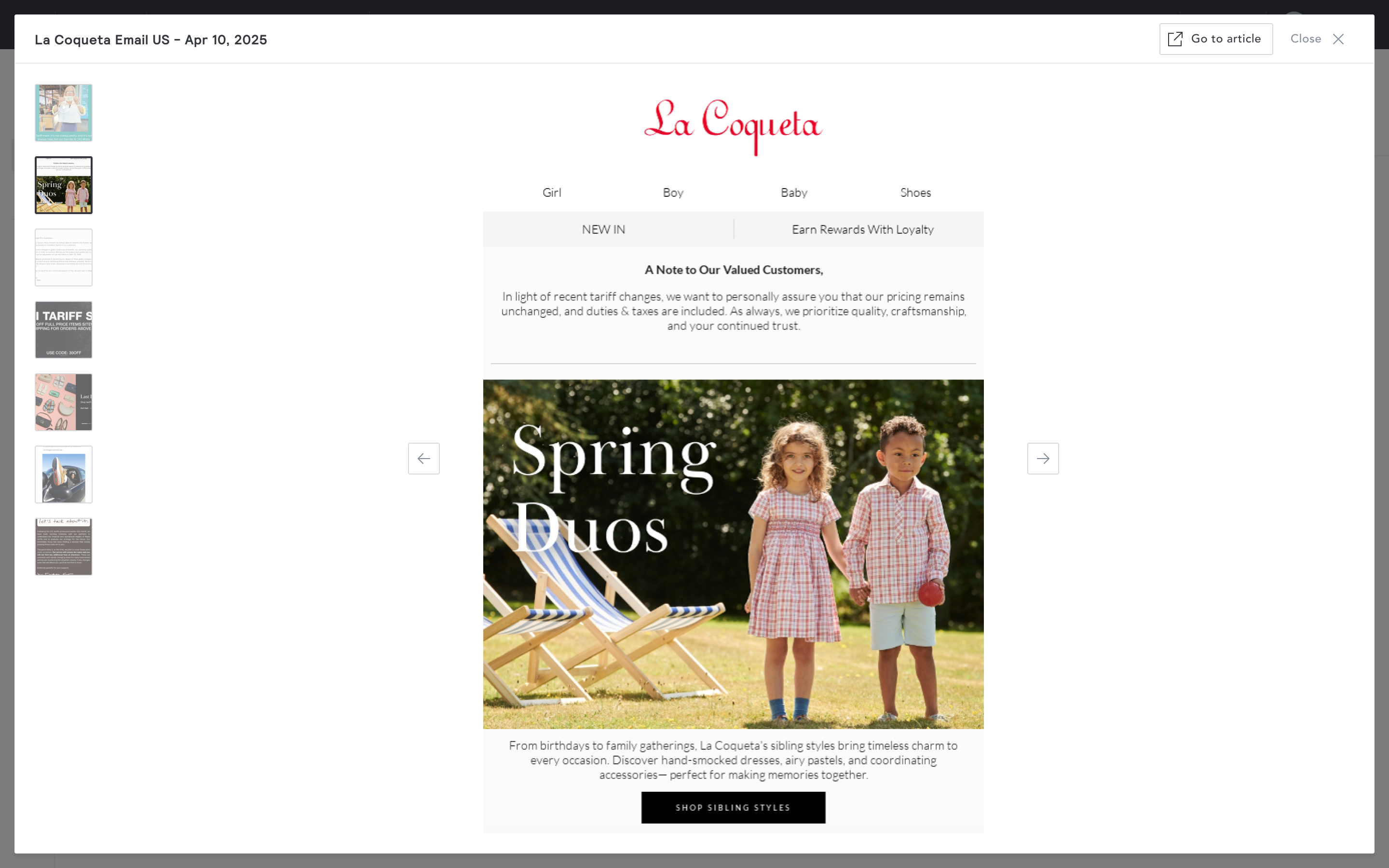
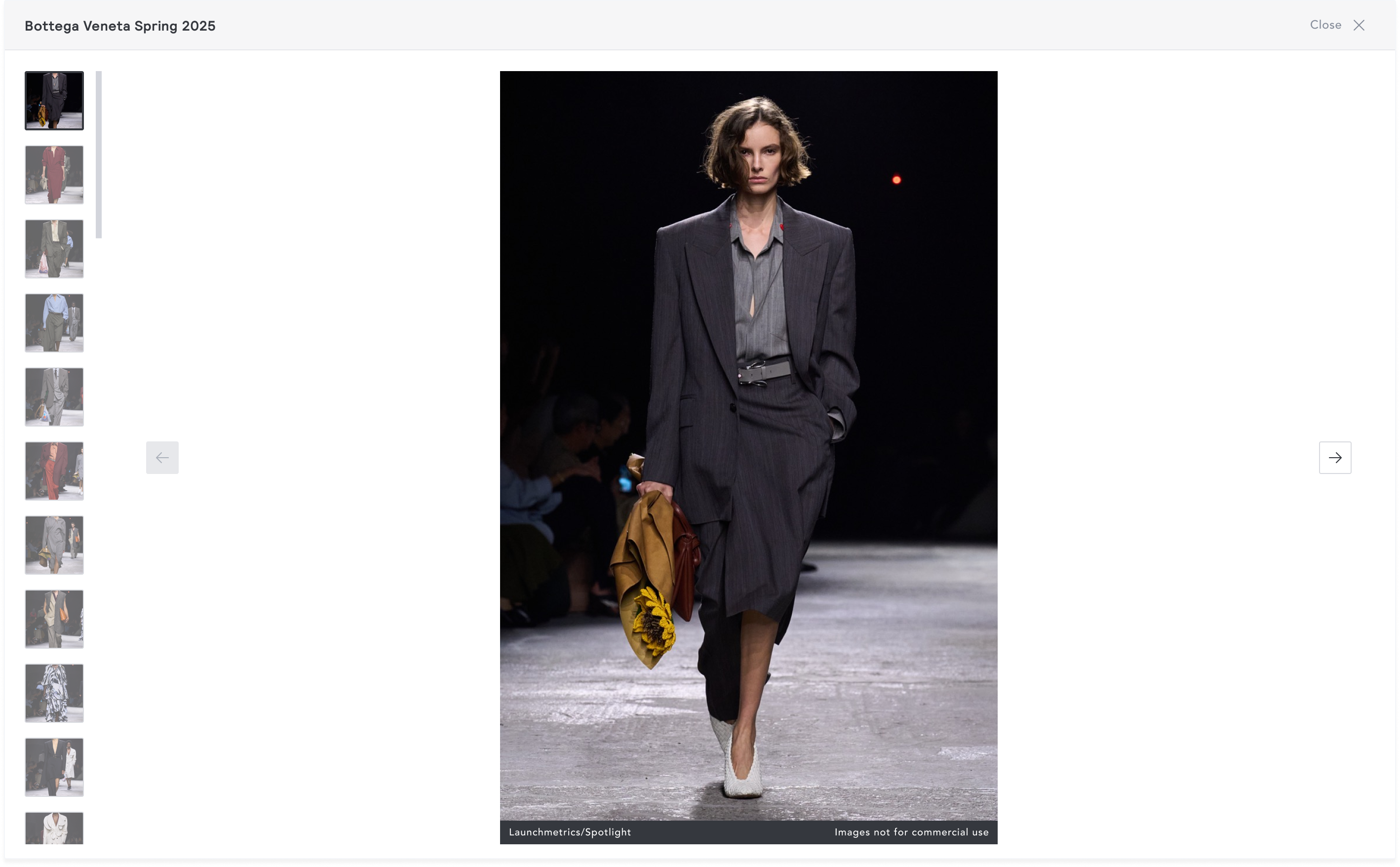
Research AI lightbox has an action button in the header component and the scroll buttons just beside the image.
Goal
The goal was to create a single, configurable lightbox component that consolidates all shared and unique requirements from existing implementations into one reusable component, replacing every existing lightbox simultaneously, handling all current use cases, and accommodating future ones without requiring a new implementation each time.
Success criteria set with the PM at project start:
- The component can be integrated across all current and future platform features
- User experience is consistent across the entire platform
- Maintenance time and development cost is significantly reduced
- The lightbox can surface as many metadata fields as required
Approach
I began by reviewing all existing lightbox implementations to identify both shared and feature-specific requirements.
Shared requirements:
- Display images
- Zoom in and out
- Title
- Close button
- Navigate between images in a set
Feature-specific requirements:
- Credit bar - unique to Research
- Action button - label and behaviour varies by feature
- Metadata panel - unique to competitive promotion
I decided that the base component would handle everything shared. Feature-specific elements would be present when configured, and absent when not.
Exploration: Action buttons
I explored having all action buttons fixed in the footer. This meant that all interactive elements are placed together, limiting the users movement to one place.
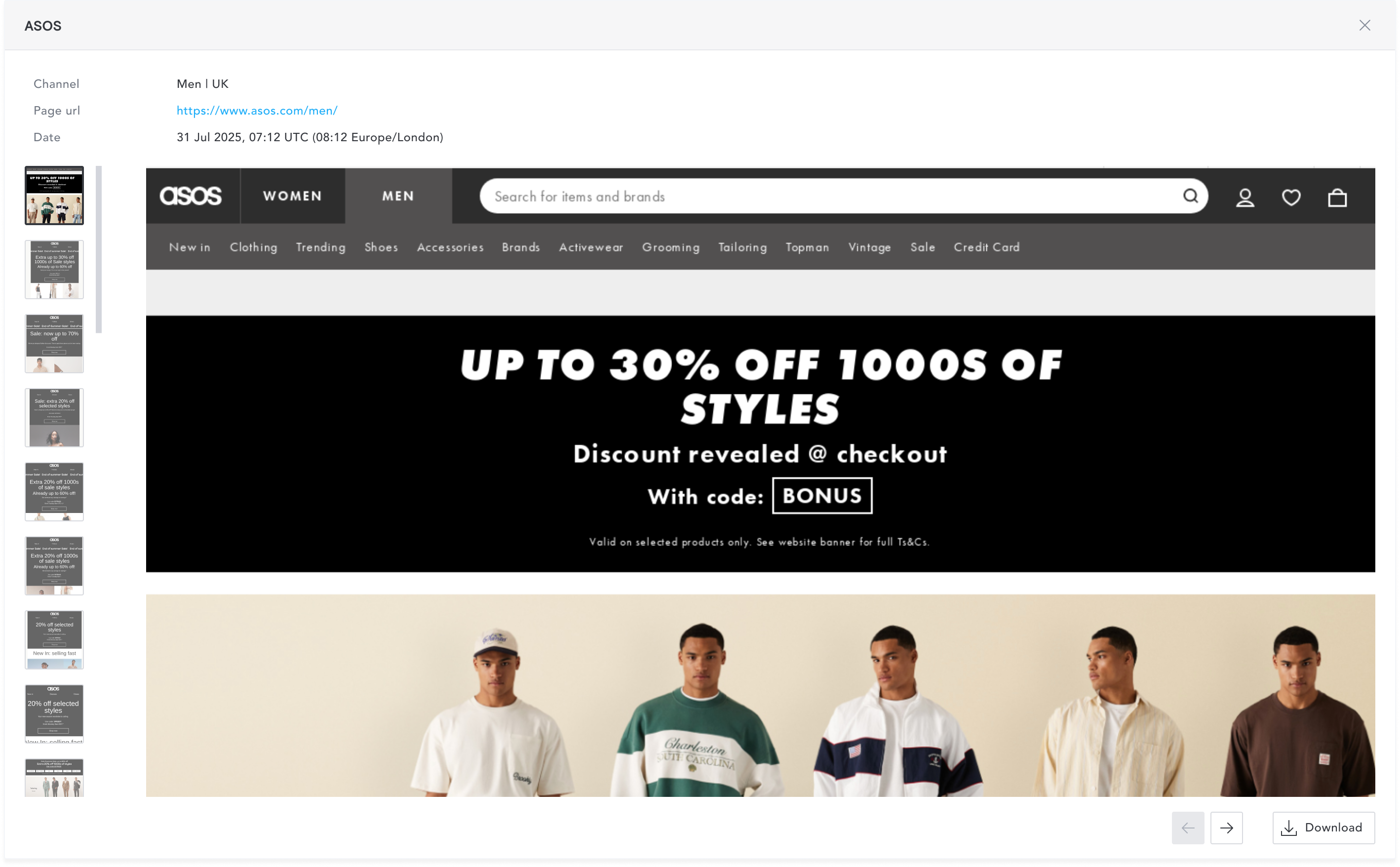
However, when a feature has no action button, the footer existed only for the scroll navigation, creating a visual disconnect between the controls and the image.
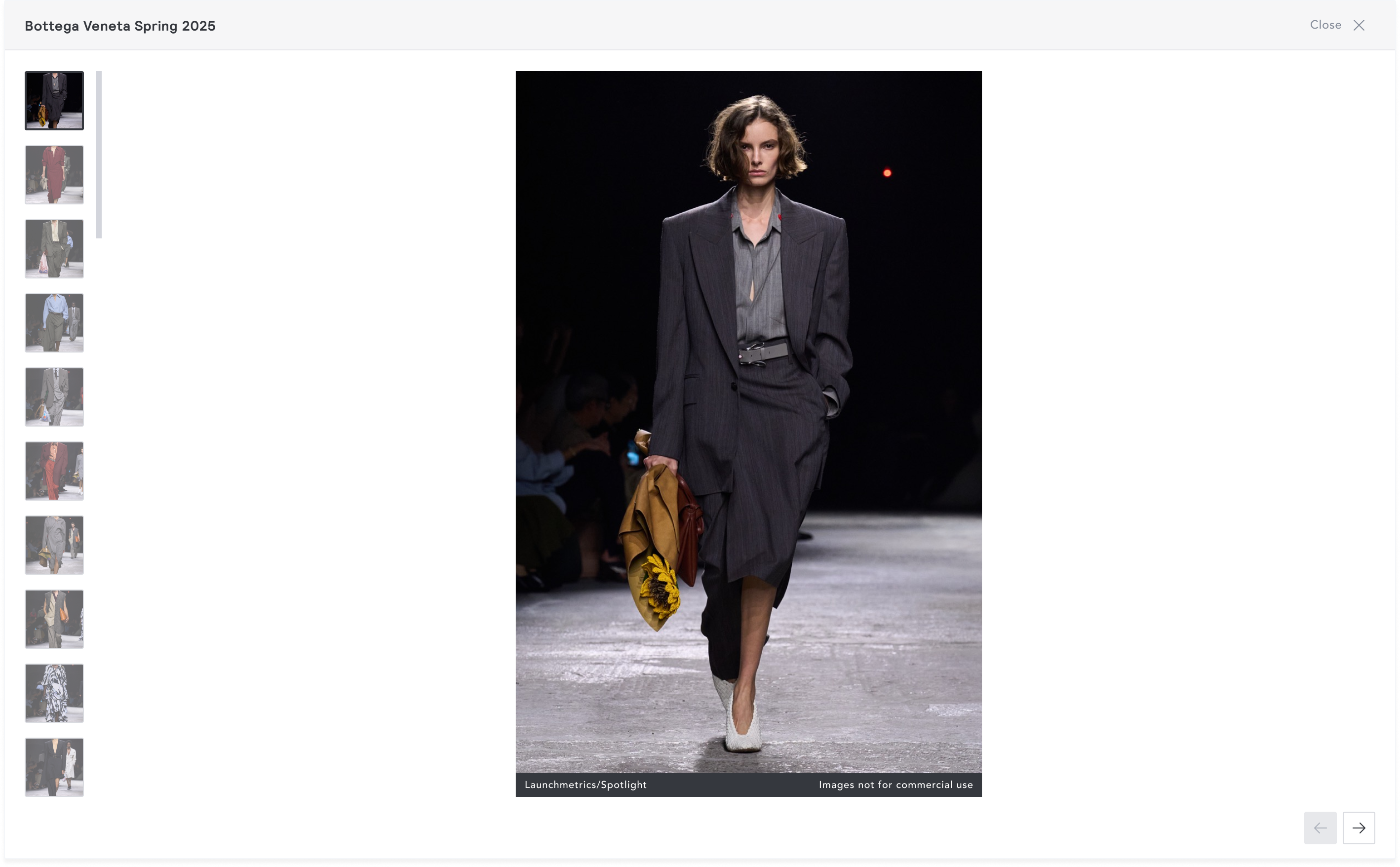
I then moved all the action buttons in the header and scroll buttons fixed to the extreme end of the image container. This resolved two problems at once. When no action button was needed, the header remained clean. And because scroll buttons were now fixed rather than positioned relative to the image width, users no longer had to reposition their cursor between images; the scroll target stayed consistent regardless of image dimensions.
Exploration: Metadata panel
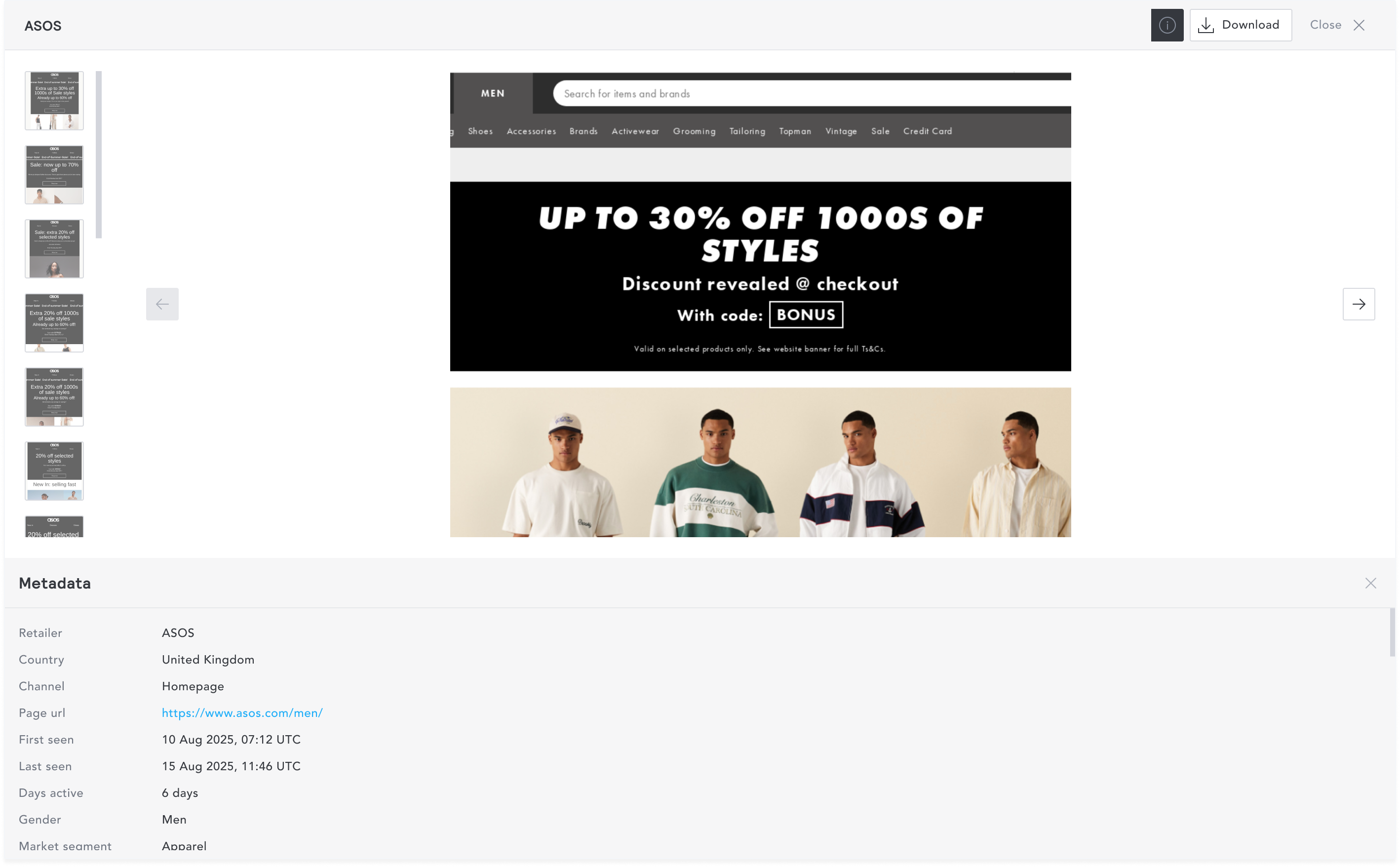
I introduced an info icon that would trigger a metadata panel which clicked. My first iteration was inspired by Google Chrome’s inspect panel. This approached placed the panel below the image and this significantly reduced the image height. The max height for the image container was 472px and mas width was 1089px. This was unacceptable because the image is the primary content of the lightbox.
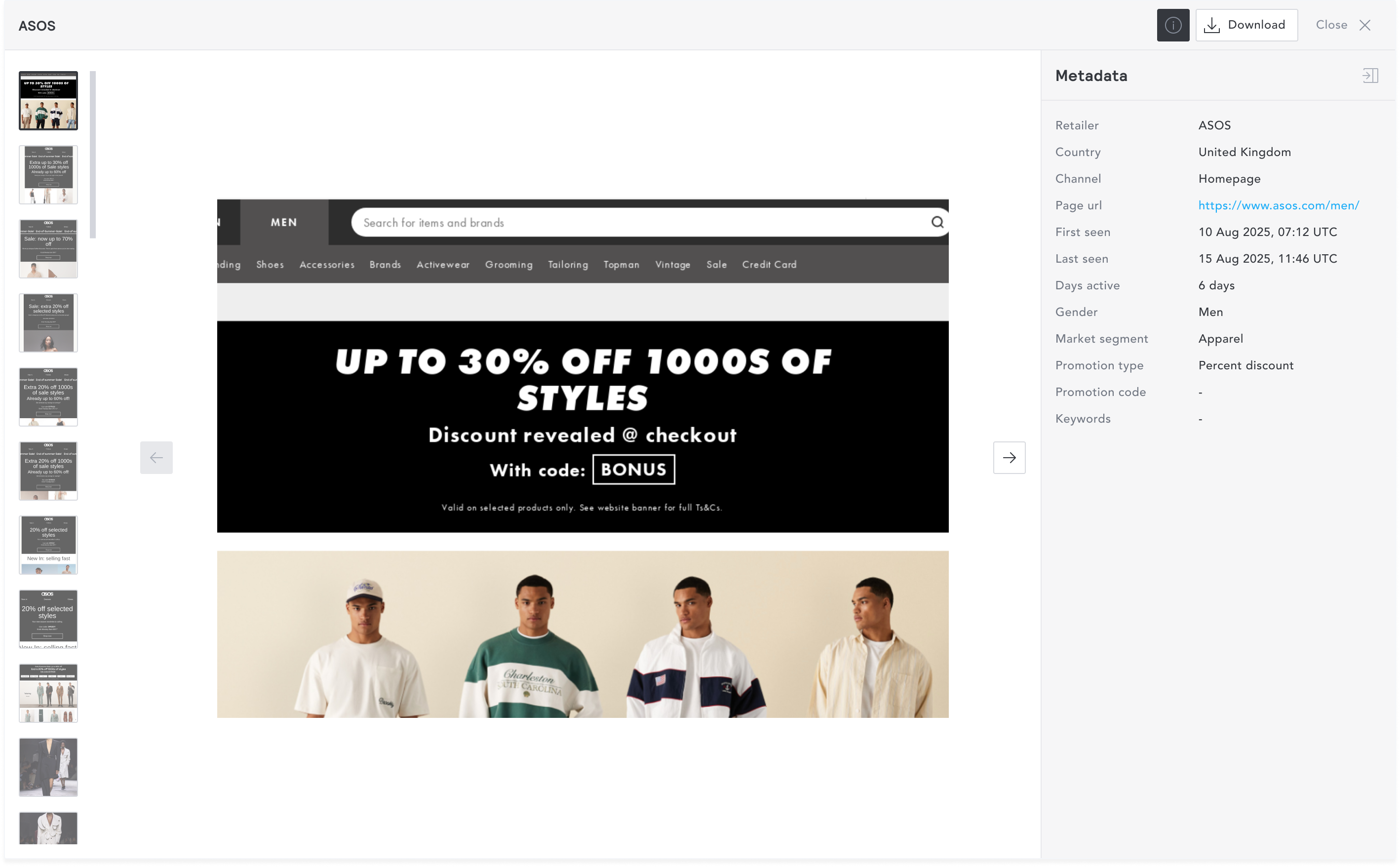
myEDITED users were already accustomed to interacting with a right side panel across the platform. Moving the metadata panel to the right resolved the constraint entirely. With the metadata panel open on the right, the max height of the image container was 783px and max width was 741px. The panel could also hold significantly more metadata fields without scrolling, and the image remained the clear focal point of the experience.
Final design
The final design places all action buttons in the header and the metadata panel on the right.
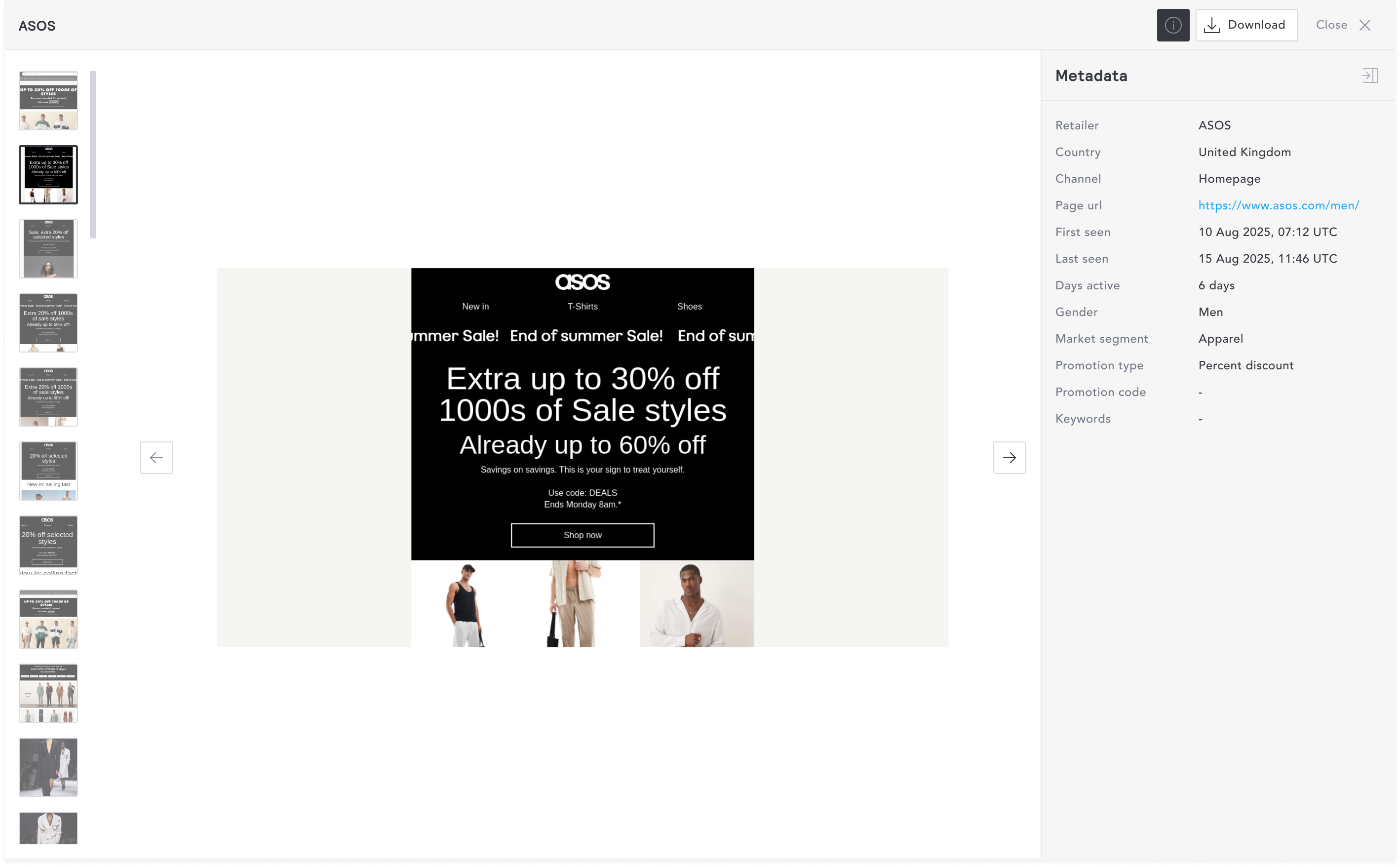
Multiple images, action button, metadata panel open
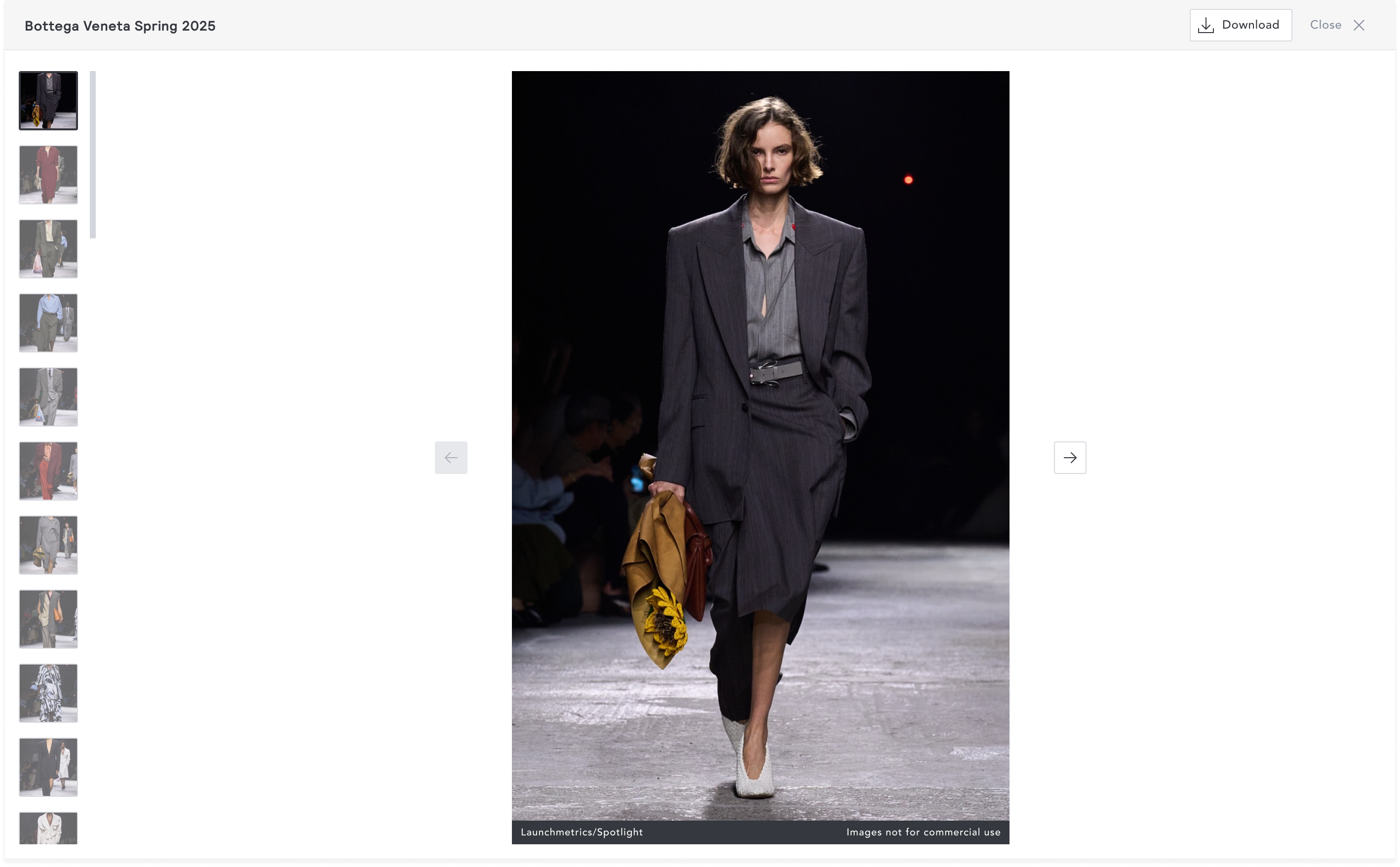
Multiple images, action button, credit bar
Multiple images, no action button, credit bar
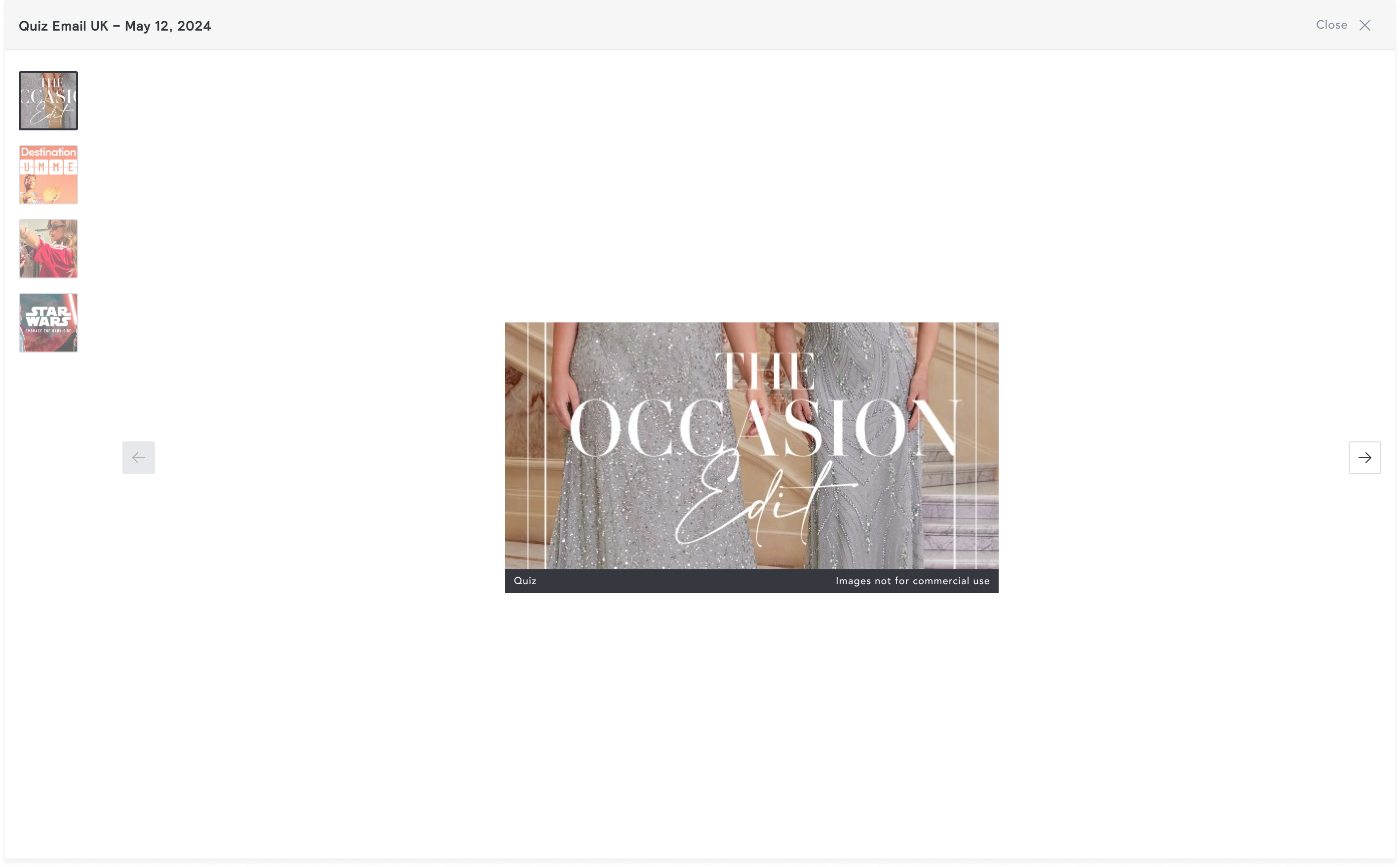
Single image, no action button, no credit bar
Keyboard shortcuts
Keyboard shortcuts were specified given the high-frequency nature of lightbox interactions:
- Arrow keys - navigate previous / next image
- Escape - close lightbox
- Tab - cycle through interactive elements
- “i” - triggers the metadata panel
Impact
The unified lightbox component shipped in a single release, replacing all existing implementations simultaneously.
The engineering team measured an 80% reduction in lightbox-related maintenance time and cost. This is a direct result of consolidating five codebases into one. Changes to shared behaviour, bug fixes, improvements, and new metadata fields now require one PR, one review, one QA cycle.
Future platform features that require a lightbox simply adopt and configure the component. The compounding maintenance cost no longer grows with the platform.
Unified lightbox component
Overview
The myEDITED platform is built around several core modules, each requiring a lightbox to display images. Because each module had unique requirements, each lightbox was built independently; its own layout, its own actions, its own codebase. Simple updates had to be made across five separate codebases, multiplying maintenance time and cost. I led the design of a unified lightbox component that works across every feature on the platform, reducing maintenance time and cost by 80% while delivering a consistent experience to users.
Problem
Five separate lightbox codebases made every fix, every change, and every extension 5x longer and expensive, and still left users with an inconsistent experience.
Engineering cost was compounding
Each lightbox had its own codebase. A fix to shared behaviour had to be made in five places, across five PRs, reviewed and tested five times. The maintenance burden scaled linearly with every feature that needed a lightbox. Engineers flagged this as an ongoing source of friction.
User experience was quietly inconsistent
Depending on which feature the user was in, some shared action buttons were placed in different locations, and required different amounts of contextual information. Although no single interaction was broken, the accumulated inconsistency meant the platform felt less coherent than it should.
Additional metadata needed to be shown
The competitive promotion lightbox only showed three metadata fields. The product team needed it to show significantly more. Adding them to the existing inline layout wasn’t viable as it would reduce the image size.
To illustrate the inconsistency:
Competitive promotions lightbox shows some metadata above the image container and has the action and scroll buttons in the footer.
Research AI lightbox has an action button in the header component and the scroll buttons just beside the image.
Goal
The goal was to create a single, configurable lightbox component that consolidates all shared and unique requirements from existing implementations into one reusable component, replacing every existing lightbox simultaneously, handling all current use cases, and accommodating future ones without requiring a new implementation each time.
Success criteria set with the PM at project start:
- The component can be integrated across all current and future platform features
- User experience is consistent across the entire platform
- Maintenance time and development cost is significantly reduced
- The lightbox can surface as many metadata fields as required
Approach
I began by reviewing all existing lightbox implementations to identify both shared and feature-specific requirements.
Shared requirements:
- Display images
- Zoom in and out
- Title
- Close button
- Navigate between images in a set
Feature-specific requirements:
- Credit bar - unique to Research
- Action button - label and behaviour varies by feature
- Metadata panel - unique to competitive promotion
I decided that the base component would handle everything shared. Feature-specific elements would be present when configured, and absent when not.
Exploration: Action buttons
I explored having all action buttons fixed in the footer. This meant that all interactive elements are placed together, limiting the users movement to one place.
However, when a feature has no action button, the footer existed only for the scroll navigation, creating a visual disconnect between the controls and the image.
I then moved all the action buttons in the header and scroll buttons fixed to the extreme end of the image container. This resolved two problems at once. When no action button was needed, the header remained clean. And because scroll buttons were now fixed rather than positioned relative to the image width, users no longer had to reposition their cursor between images; the scroll target stayed consistent regardless of image dimensions.
Exploration: Metadata panel
I introduced an info icon that would trigger a metadata panel which clicked. My first iteration was inspired by Google Chrome’s inspect panel. This approached placed the panel below the image and this significantly reduced the image height. The max height for the image container was 472px and mas width was 1089px. This was unacceptable because the image is the primary content of the lightbox.
myEDITED users were already accustomed to interacting with a right side panel across the platform. Moving the metadata panel to the right resolved the constraint entirely. With the metadata panel open on the right, the max height of the image container was 783px and max width was 741px. The panel could also hold significantly more metadata fields without scrolling, and the image remained the clear focal point of the experience.
Final design
The final design places all action buttons in the header and the metadata panel on the right.
Multiple images, action button, metadata panel open
Multiple images, action button, credit bar
Multiple images, no action button, credit bar
Single image, no action button, no credit bar
Keyboard shortcuts
Keyboard shortcuts were specified given the high-frequency nature of lightbox interactions:
- Arrow keys - navigate previous / next image
- Escape - close lightbox
- Tab - cycle through interactive elements
- “i” - triggers the metadata panel
Impact
The unified lightbox component shipped in a single release, replacing all existing implementations simultaneously.
The engineering team measured an 80% reduction in lightbox-related maintenance time and cost. This is a direct result of consolidating five codebases into one. Changes to shared behaviour, bug fixes, improvements, and new metadata fields now require one PR, one review, one QA cycle.
Future platform features that require a lightbox simply adopt and configure the component. The compounding maintenance cost no longer grows with the platform.
Unified lightbox component
Overview
The myEDITED platform is built around several core modules, each requiring a lightbox to display images. Because each module had unique requirements, each lightbox was built independently; its own layout, its own actions, its own codebase. Simple updates had to be made across five separate codebases, multiplying maintenance time and cost. I led the design of a unified lightbox component that works across every feature on the platform, reducing maintenance time and cost by 80% while delivering a consistent experience to users.
Problem
Five separate lightbox codebases made every fix, every change, and every extension 5x longer and expensive, and still left users with an inconsistent experience.
Engineering cost was compounding
Each lightbox had its own codebase. A fix to shared behaviour had to be made in five places, across five PRs, reviewed and tested five times. The maintenance burden scaled linearly with every feature that needed a lightbox. Engineers flagged this as an ongoing source of friction.
User experience was quietly inconsistent
Depending on which feature the user was in, some shared action buttons were placed in different locations, and required different amounts of contextual information. Although no single interaction was broken, the accumulated inconsistency meant the platform felt less coherent than it should.
Additional metadata needed to be shown
The competitive promotion lightbox only showed three metadata fields. The product team needed it to show significantly more. Adding them to the existing inline layout wasn’t viable as it would reduce the image size.
To illustrate the inconsistency:
Competitive promotions lightbox shows some metadata above the image container and has the action and scroll buttons in the footer.
Research AI lightbox has an action button in the header component and the scroll buttons just beside the image.
Goal
The goal was to create a single, configurable lightbox component that consolidates all shared and unique requirements from existing implementations into one reusable component, replacing every existing lightbox simultaneously, handling all current use cases, and accommodating future ones without requiring a new implementation each time.
Success criteria set with the PM at project start:
- The component can be integrated across all current and future platform features
- User experience is consistent across the entire platform
- Maintenance time and development cost is significantly reduced
- The lightbox can surface as many metadata fields as required
Approach
I began by reviewing all existing lightbox implementations to identify both shared and feature-specific requirements.
Shared requirements:
- Display images
- Zoom in and out
- Title
- Close button
- Navigate between images in a set
Feature-specific requirements:
- Credit bar - unique to Research
- Action button - label and behaviour varies by feature
- Metadata panel - unique to competitive promotion
I decided that the base component would handle everything shared. Feature-specific elements would be present when configured, and absent when not.
Exploration: Action buttons
I explored having all action buttons fixed in the footer. This meant that all interactive elements are placed together, limiting the users movement to one place.
However, when a feature has no action button, the footer existed only for the scroll navigation, creating a visual disconnect between the controls and the image.
I then moved all the action buttons in the header and scroll buttons fixed to the extreme end of the image container. This resolved two problems at once. When no action button was needed, the header remained clean. And because scroll buttons were now fixed rather than positioned relative to the image width, users no longer had to reposition their cursor between images; the scroll target stayed consistent regardless of image dimensions.
Exploration: Metadata panel
I introduced an info icon that would trigger a metadata panel which clicked. My first iteration was inspired by Google Chrome’s inspect panel. This approached placed the panel below the image and this significantly reduced the image height. The max height for the image container was 472px and mas width was 1089px. This was unacceptable because the image is the primary content of the lightbox.
myEDITED users were already accustomed to interacting with a right side panel across the platform. Moving the metadata panel to the right resolved the constraint entirely. With the metadata panel open on the right, the max height of the image container was 783px and max width was 741px. The panel could also hold significantly more metadata fields without scrolling, and the image remained the clear focal point of the experience.
Final design
The final design places all action buttons in the header and the metadata panel on the right.
Multiple images, action button, metadata panel open
Multiple images, action button, credit bar
Multiple images, no action button, credit bar
Single image, no action button, no credit bar
Keyboard shortcuts
Keyboard shortcuts were specified given the high-frequency nature of lightbox interactions:
- Arrow keys - navigate previous / next image
- Escape - close lightbox
- Tab - cycle through interactive elements
- “i” - triggers the metadata panel
Impact
The unified lightbox component shipped in a single release, replacing all existing implementations simultaneously.
The engineering team measured an 80% reduction in lightbox-related maintenance time and cost. This is a direct result of consolidating five codebases into one. Changes to shared behaviour, bug fixes, improvements, and new metadata fields now require one PR, one review, one QA cycle.
Future platform features that require a lightbox simply adopt and configure the component. The compounding maintenance cost no longer grows with the platform.