ahead app: onboarding
Overview
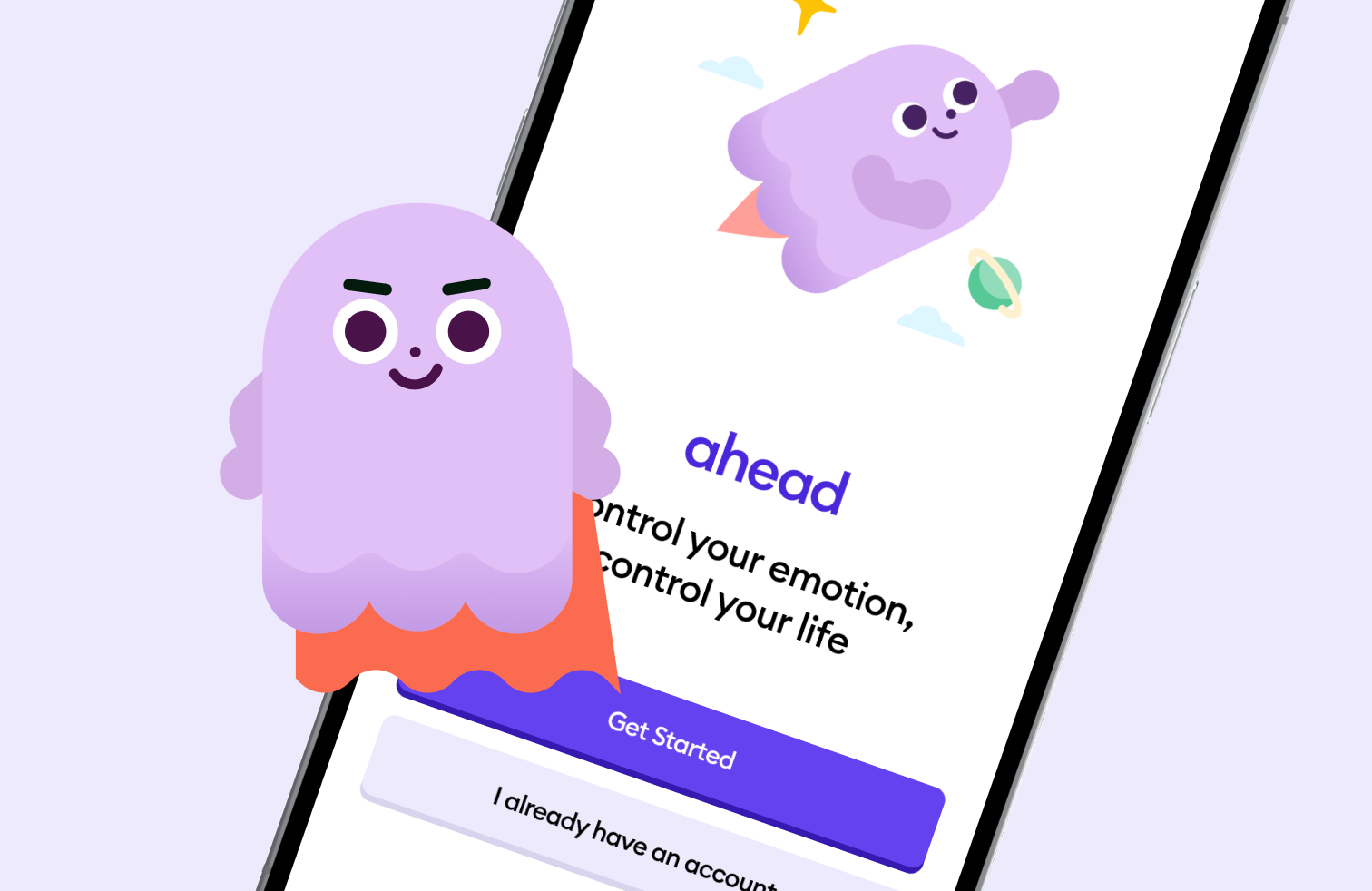
ahead is a digital emotional intelligence coach, marketed as "the Duolingo of emotional intelligence". It offers personalised journeys to help users manage emotions, build confidence, and improve productivity. This was a personal project. I came across the app, liked the concept immediately, and signed up. But the onboarding was long enough that I lost interest before ever seeing what the product actually had to offer. I chose it as a design challenge because I believed the problem was solvable, and that fixing it would directly improve both user retention and conversion. In the end, In the end, I reduced the number of onboarding screens by 22.58%, actions required by 43.48% and completion time by 43.37%.
Research and ideation
I went through the existing onboarding end-to-end, documenting every screen and interaction. The current flow required 31 screens, 46 actions, and 5 minutes 32 seconds to complete and this is all before a user had experienced a single core feature of the app.
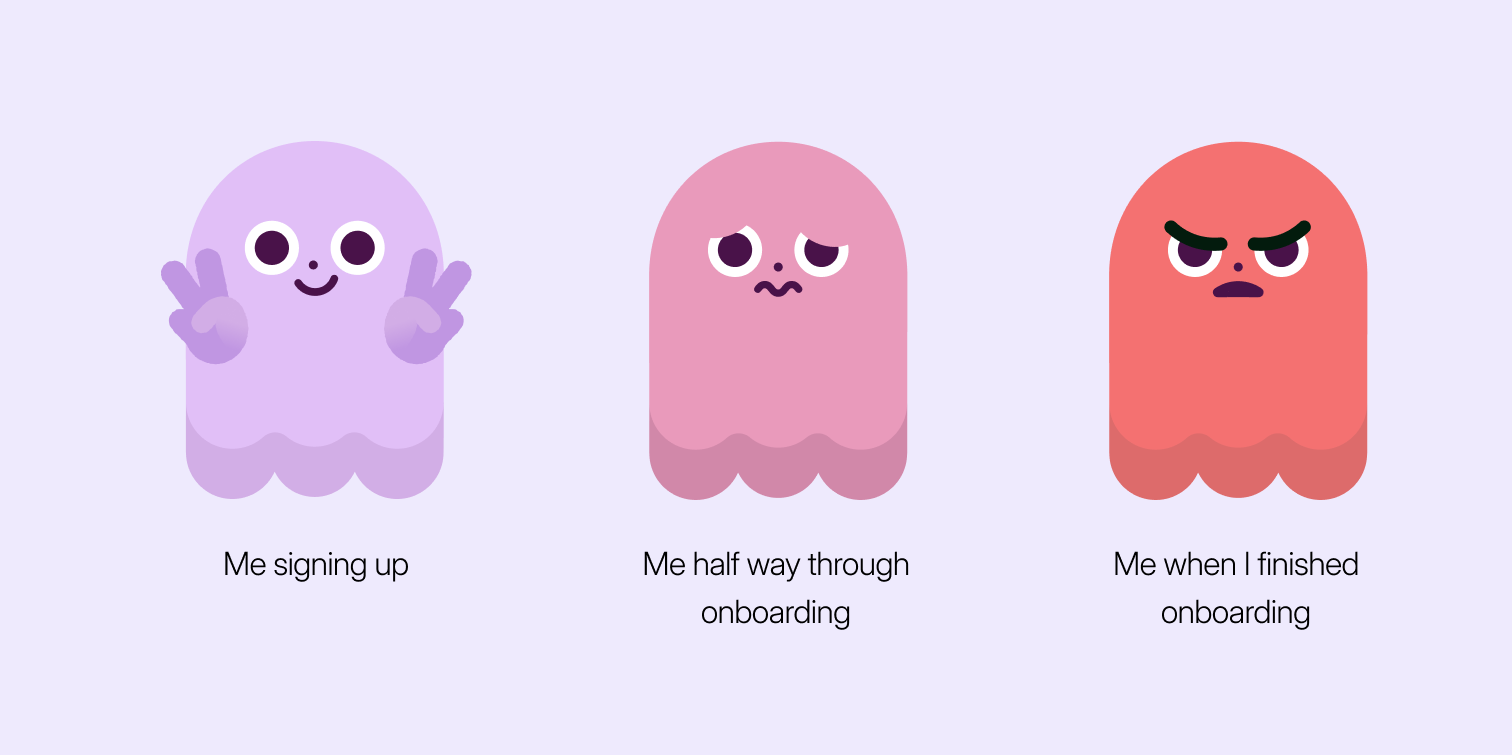
Several specific problems stood out:
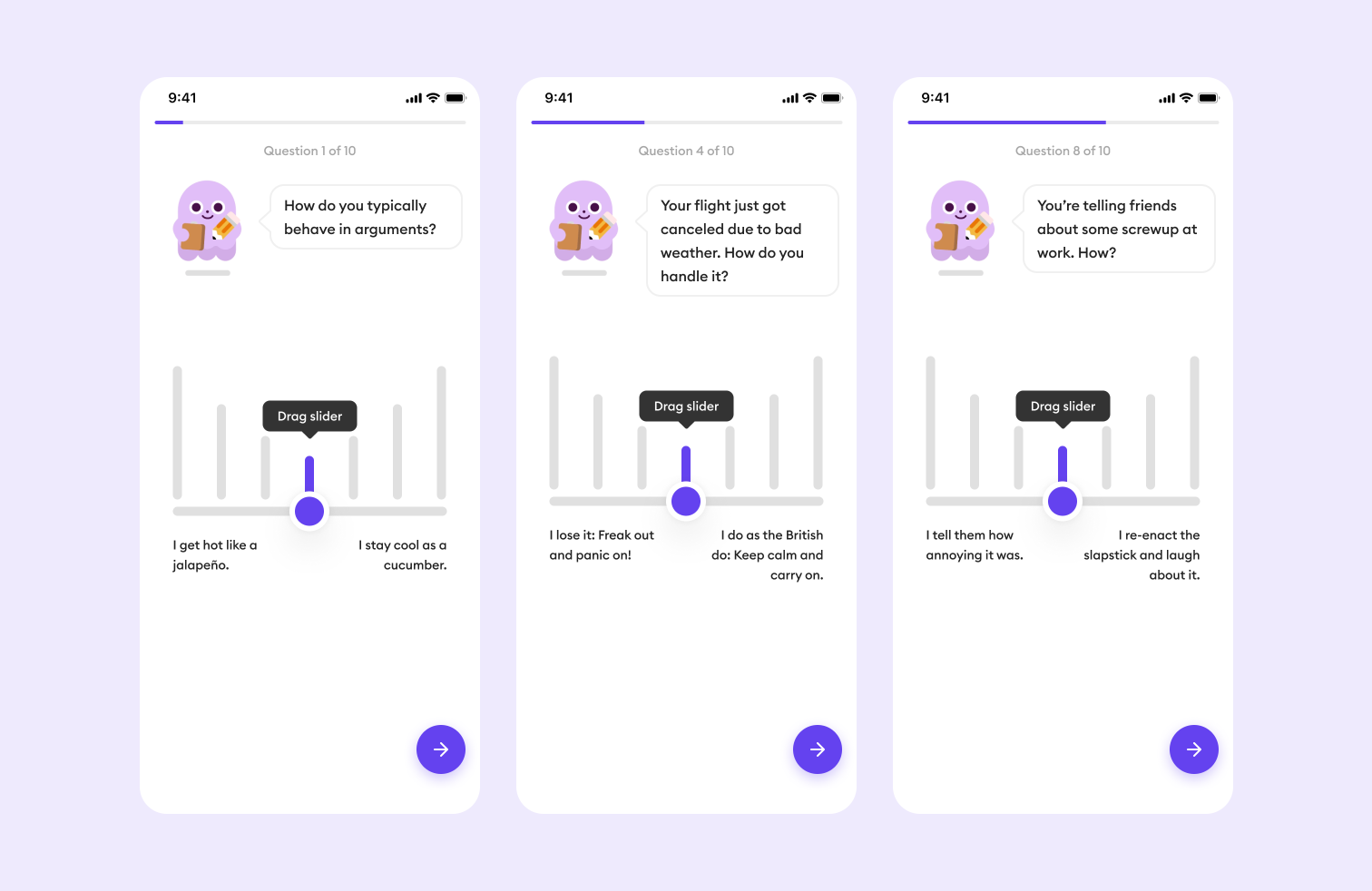
Sliders were the primary input for the personality questions: While sliding is no doubt a great experience, it has many drawbacks such as:
- the midpoints between the two ends are ambiguous and open to interpretation,
- it's easy to slide past the desired position, and
- each screen requires at minimum two actions; a drag and a tap to confirm. Across 10 screens, that's a minimum of 20 actions just for the personality questions.
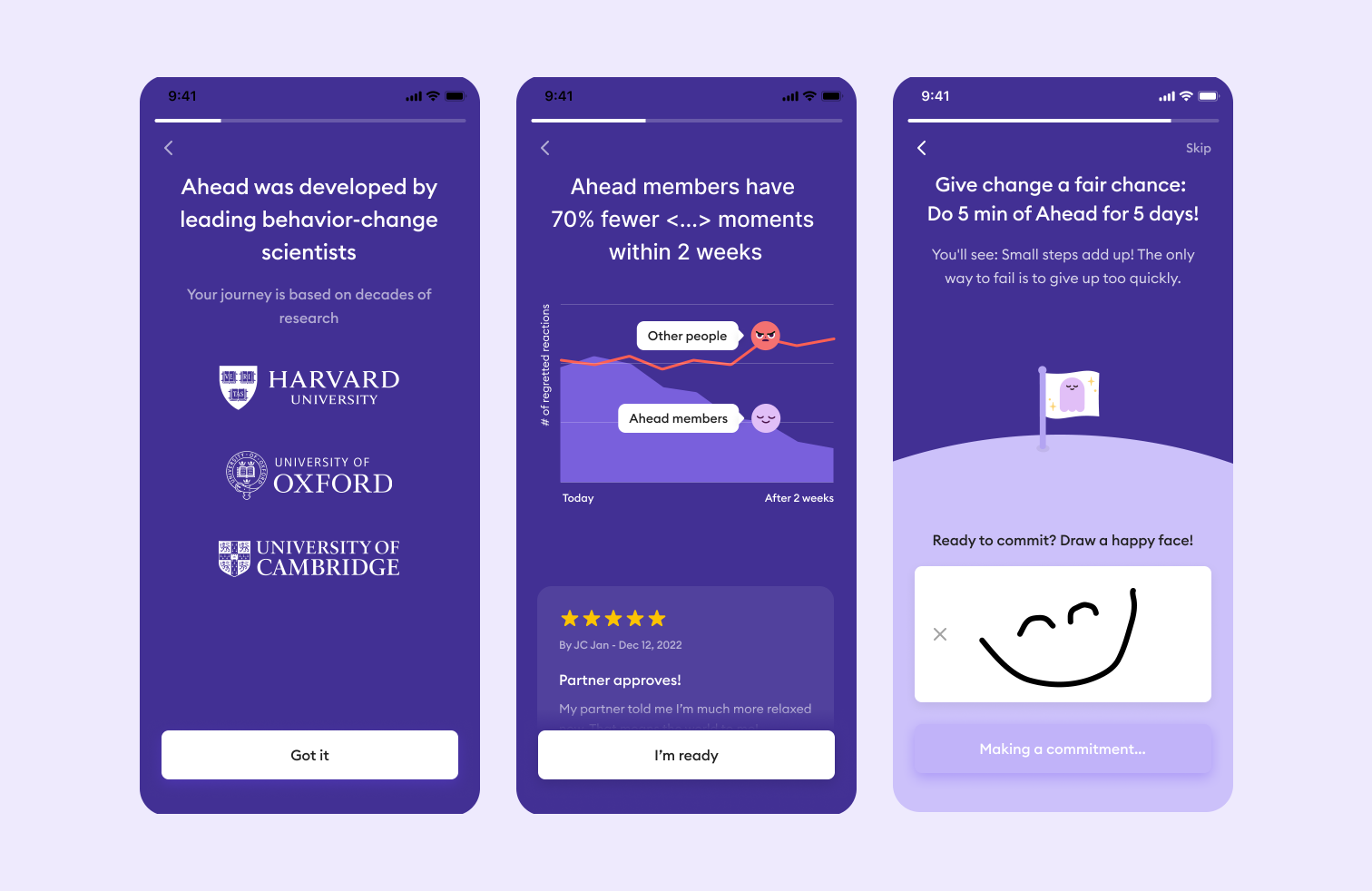
Value proposition shown too late: After the personalisation screens, the next set of screens show social proof, scientific credibility, and outcome statistics, I believe this is the worst possible placement for content designed to build trust and motivation.
Payment wall: At the end of onboarding, a payment flow appeared requiring the user to commit to a subscription before experiencing a single feature. Reviews confirmed this was a widespread frustration with users citing it as their primary reason for uninstalling.
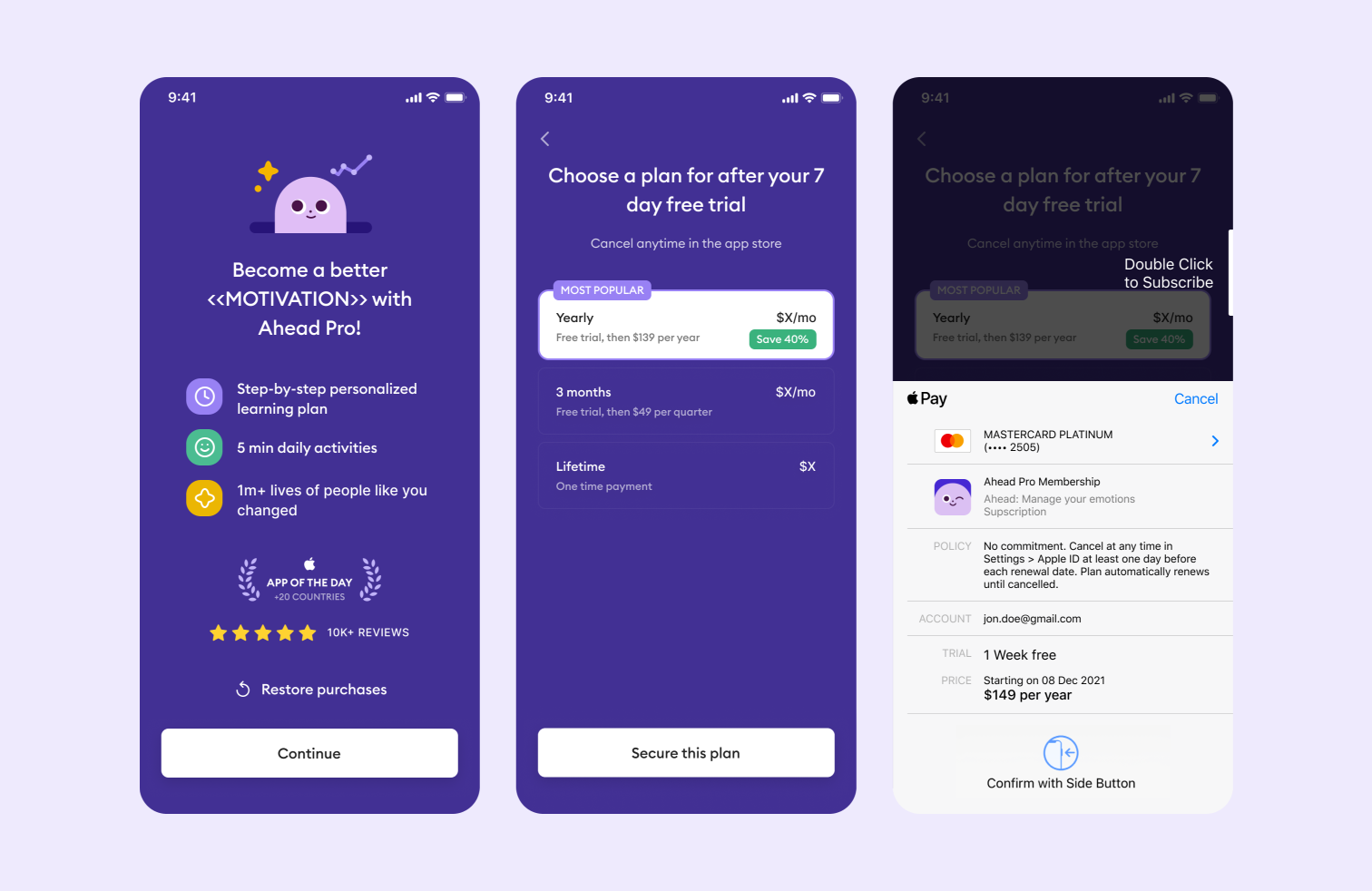
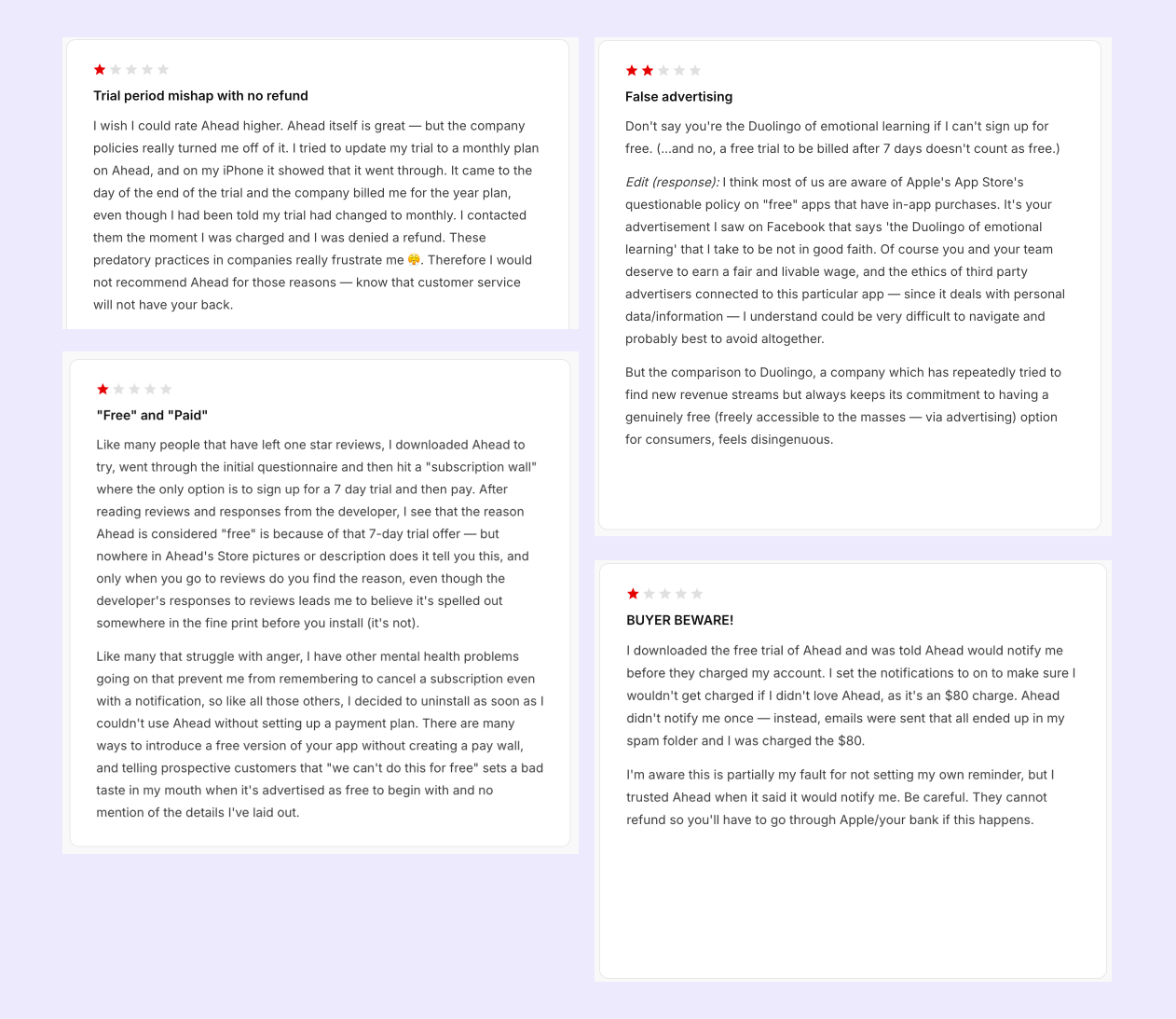
These aren't minor UX inconveniences; they're trust failures that cost the app users at its most critical moment. The research conclusion was clear: the current onboarding flow would lead to high drop-offs, particularly at the point of payment.
Hypotheses
Two changes I believed would have the highest impact:
- Reduce onboarding time: By reducing the number of screens and actions, I expected to decrease total onboarding time by at least 40%, improving user satisfaction and reducing drop-off rates.
- Remove upfront payment commitment: By offering a free trial without requiring payment details upfront, I expected to reduce the drop-off rate at the payment stage by 25%. Lowering the initial commitment barrier makes users more likely to engage fully with the trial and ultimately convert.
I chose to focus on time spent on onboarding and drop-off rate as the primary metrics because they give the most granular view of friction during the initial experience. Reducing both lowers user acquisition costs by improving the ratio of sign-ups that actually reach the product.
Goal
To reduce the number of screens and actions required to complete onboarding, thereby reducing the drop-off rate.
Splash screens
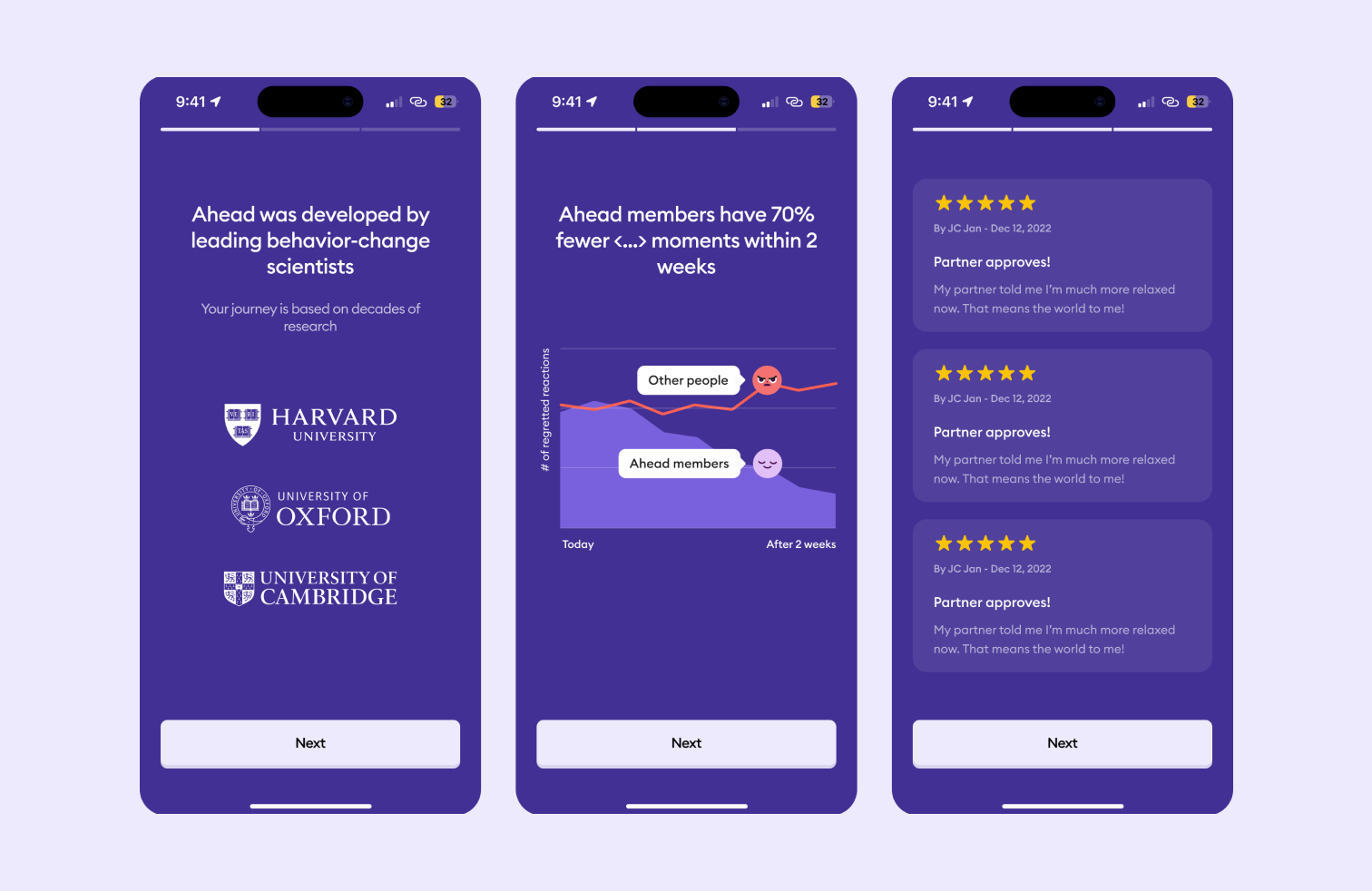
The scientific credibility and social proof content was originally placed immediately before the payment screen. That content exists to build trust and conviction, and it's most effective at the very beginning of the journey, before users are asked to invest time or money.
I moved it to the front of the flow as splash screens. Users arrive already primed with the evidence for why ahead works even before answering a single question. This reduces the effort needed to build buy-in later when it matters most.
Personalisation
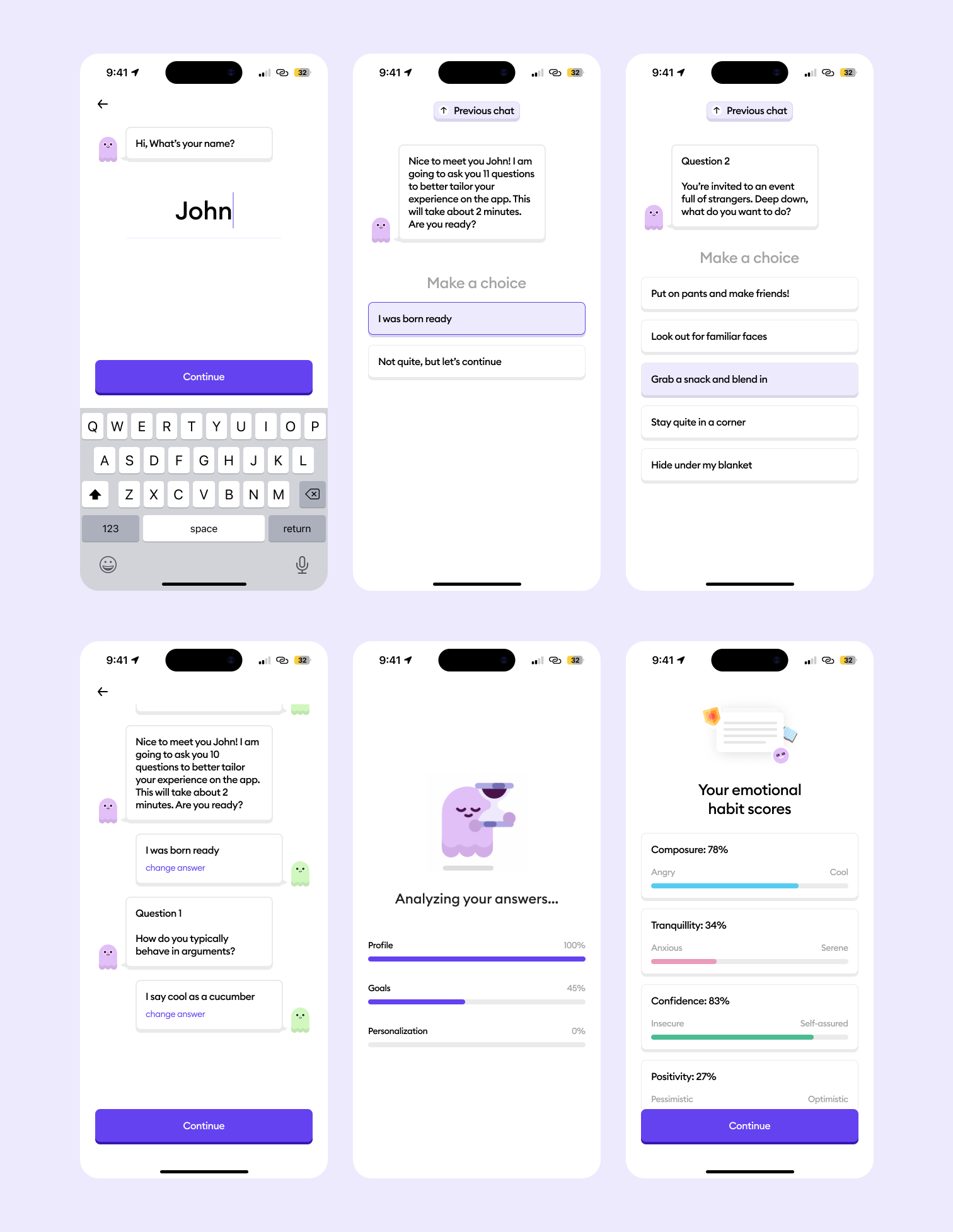
The original questionnaire used sliders for behavioural questions. I redesigned this section as a conversational chat between the user and the ahead mascot, for two reasons.
- It creates a distinctive experience that aligns with ahead's playful brand and is different from the generic form-filling that most apps default to.
- It solves a navigation problem. In the original flow, changing a previous answer meant pressing back through multiple screens. In the redesigned flow, a fixed "Previous chat" CTA takes users directly to the chat history, where they can scroll to any question, update their answer, and continue, without losing their place.
Sliders were replaced with clear, discrete answer options, eliminating the ambiguity that came with having to position a handle between two unlabelled extremes.
I also removed the explicit "next" button. Selecting an option automatically advances to the next question. This draws from the 5-second rule in behavioural testing: the first instinctive response to a question tends to be the most accurate reflection of genuine behaviour. Removing the confirmation step discourages overthinking and produces more spontaneous, honest answers which improves the quality of personalisation downstream.
Payment wall
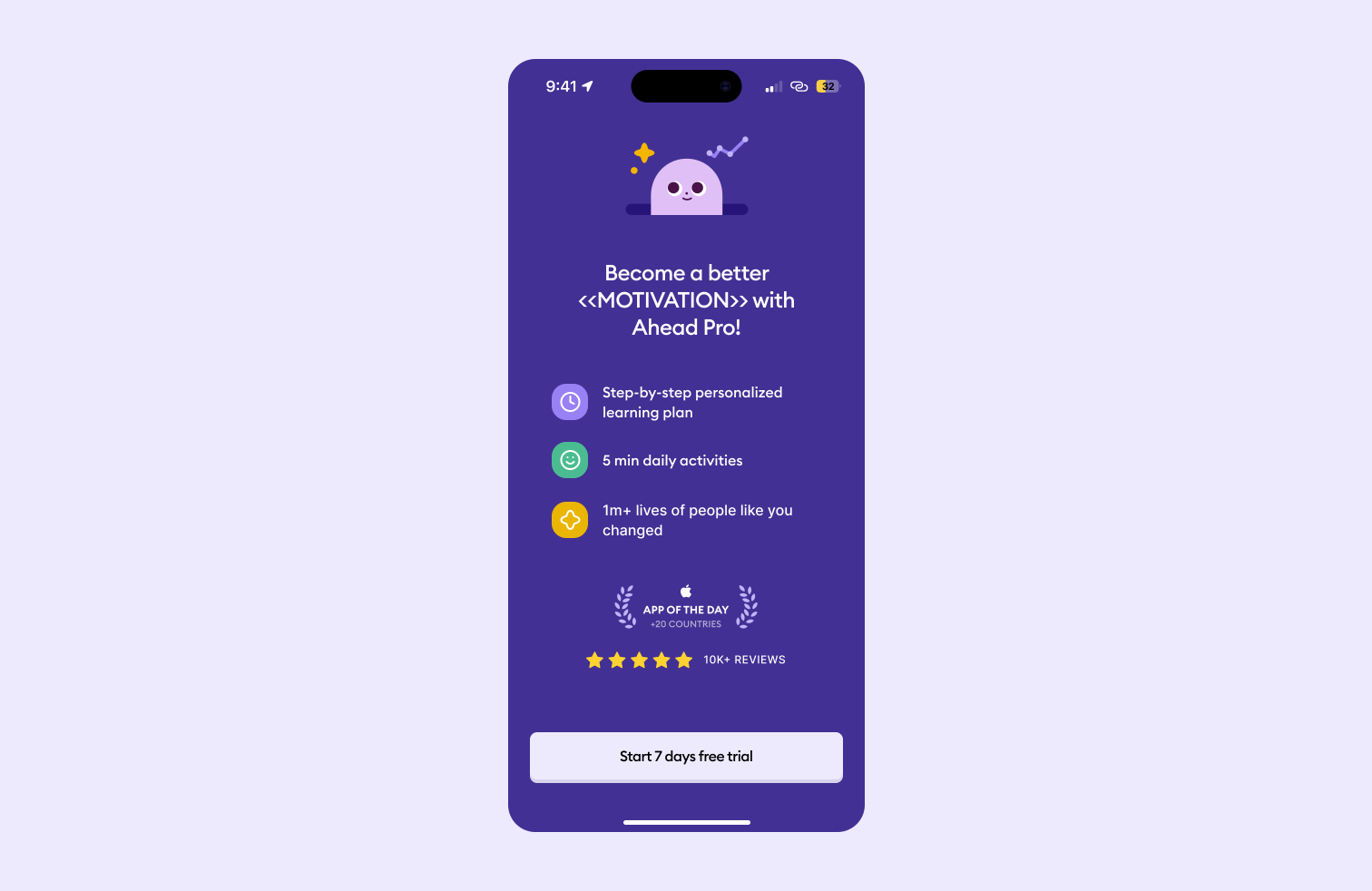
I replaced the entire payment flow with a single screen prompting users to start a free 7-day trial. By this point in the redesigned flow, users have seen the scientific backing, answered their personalisation questions, received their emotional habit scores, and selected their journeys. They have context and motivation. A single, low-commitment CTA to start a free trial is far less likely to cause drop-off than a full subscription flow presented to a user who hasn't yet experienced anything.
Impact
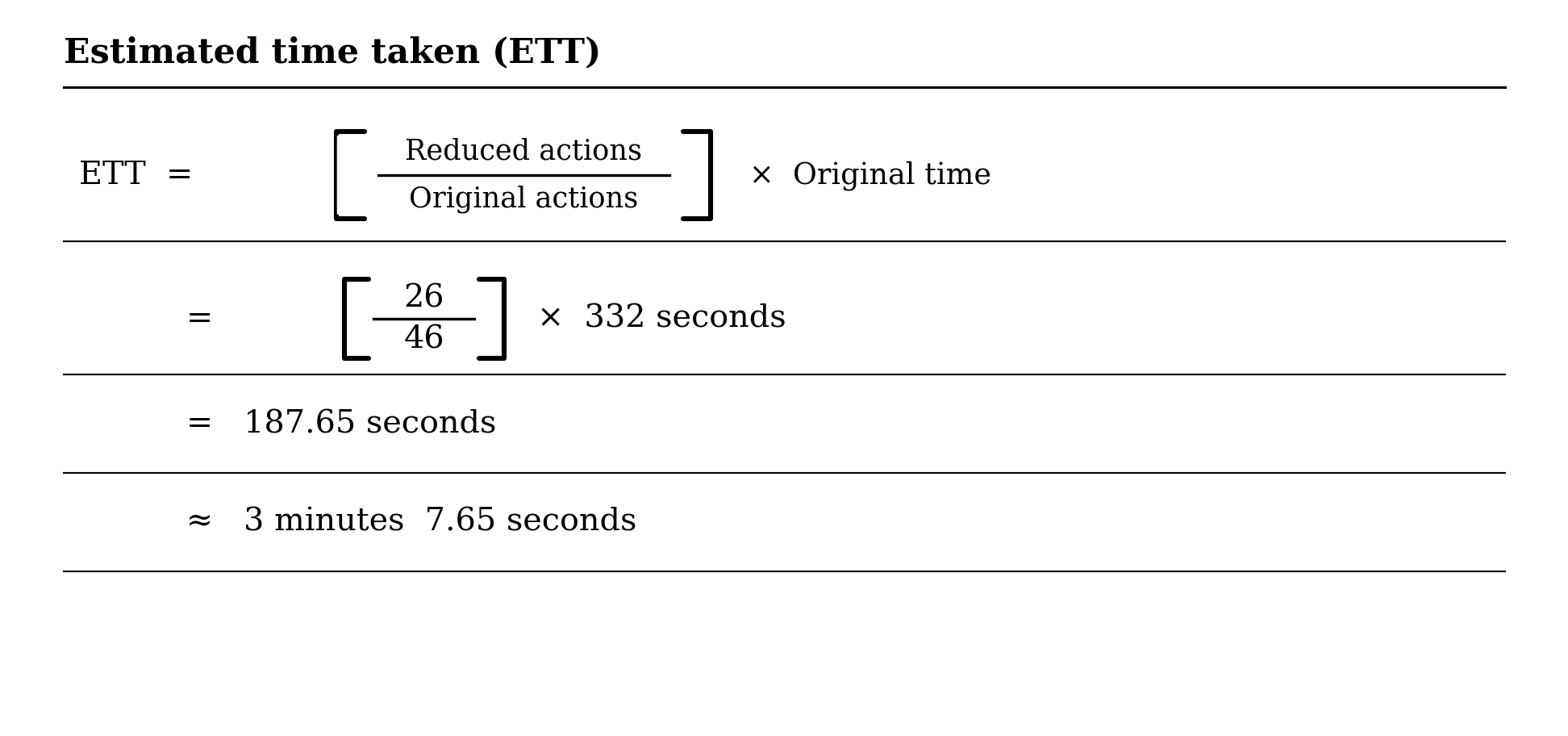
The redesigned onboarding requires 24 screens, 26 actions, and 3 minutes 8 seconds to complete.
Metric
Screens
Actions required
Time to complete
Before
31
46
5m 32s
After
24
26
3m 8s
% difference
-22.58%
-43.48%
-43.37%
The estimated completion time was calculated without building a prototype, by applying the ratio of reduced to original actions against the original measured time.
Limitations
The screen count could have been reduced further by removing certain personalisation questions. However, without full visibility into how each question contributes to the underlying personalisation model, I chose to retain them all. What looks redundant from a UX perspective may have a meaningful impact on the accuracy of the output and that's a decision that requires input from the product and data teams, not a design assumption.
ahead app: onboarding
Overview
ahead is a digital emotional intelligence coach, marketed as "the Duolingo of emotional intelligence". It offers personalised journeys to help users manage emotions, build confidence, and improve productivity. This was a personal project. I came across the app, liked the concept immediately, and signed up. But the onboarding was long enough that I lost interest before ever seeing what the product actually had to offer. I chose it as a design challenge because I believed the problem was solvable, and that fixing it would directly improve both user retention and conversion. In the end, I reduced the number of onboarding screens by 22.58%, actions required by 43.48% and completion time by 43.37%.
Research and ideation
I went through the existing onboarding end-to-end, documenting every screen and interaction. The current flow required 31 screens, 46 actions, and 5 minutes 32 seconds to complete and this is all before a user had experienced a single core feature of the app.
Several specific problems stood out:
Sliders were the primary input for the personality questions: While sliding is no doubt a great experience, it has many drawbacks such as:
- the midpoints between the two ends are ambiguous and open to interpretation,
- it's easy to slide past the desired position, and
- each screen requires at minimum two actions; a drag and a tap to confirm. Across 10 screens, that's a minimum of 20 actions just for the personality questions.
Value proposition shown too late: After the personalisation screens, the next set of screens show social proof, scientific credibility, and outcome statistics, I believe this is the worst possible placement for content designed to build trust and motivation.
Payment wall: At the end of onboarding, a payment flow appeared requiring the user to commit to a subscription before experiencing a single feature. Reviews confirmed this was a widespread frustration with users citing it as their primary reason for uninstalling.
These aren't minor UX inconveniences; they're trust failures that cost the app users at its most critical moment. The research conclusion was clear: the current onboarding flow would lead to high drop-offs, particularly at the point of payment.
Hypotheses
Two changes I believed would have the highest impact:
- Reduce onboarding time: By reducing the number of screens and actions, I expected to decrease total onboarding time by at least 40%, improving user satisfaction and reducing drop-off rates.
- Remove upfront payment commitment: By offering a free trial without requiring payment details upfront, I expected to reduce the drop-off rate at the payment stage by 25%. Lowering the initial commitment barrier makes users more likely to engage fully with the trial and ultimately convert.
I chose to focus on time spent on onboarding and drop-off rate as the primary metrics because they give the most granular view of friction during the initial experience. Reducing both lowers user acquisition costs by improving the ratio of sign-ups that actually reach the product.
Goal
To reduce the number of screens and actions required to complete onboarding, thereby reducing the drop-off rate.
Splash screens
The scientific credibility and social proof content was originally placed immediately before the payment screen. That content exists to build trust and conviction, and it's most effective at the very beginning of the journey, before users are asked to invest time or money.
I moved it to the front of the flow as splash screens. Users arrive already primed with the evidence for why ahead works even before answering a single question. This reduces the effort needed to build buy-in later when it matters most.
Personalisation
The original questionnaire used sliders for behavioural questions. I redesigned this section as a conversational chat between the user and the ahead mascot, for two reasons.
- It creates a distinctive experience that aligns with ahead's playful brand and is different from the generic form-filling that most apps default to.
- It solves a navigation problem. In the original flow, changing a previous answer meant pressing back through multiple screens. In the redesigned flow, a fixed "Previous chat" CTA takes users directly to the chat history, where they can scroll to any question, update their answer, and continue, without losing their place.
Sliders were replaced with clear, discrete answer options, eliminating the ambiguity that came with having to position a handle between two unlabelled extremes.
I also removed the explicit "next" button. Selecting an option automatically advances to the next question. This draws from the 5-second rule in behavioural testing: the first instinctive response to a question tends to be the most accurate reflection of genuine behaviour. Removing the confirmation step discourages overthinking and produces more spontaneous, honest answers which improves the quality of personalisation downstream.
Payment wall
I replaced the entire payment flow with a single screen prompting users to start a free 7-day trial. By this point in the redesigned flow, users have seen the scientific backing, answered their personalisation questions, received their emotional habit scores, and selected their journeys. They have context and motivation. A single, low-commitment CTA to start a free trial is far less likely to cause drop-off than a full subscription flow presented to a user who hasn't yet experienced anything.
Impact
The redesigned onboarding requires 24 screens, 26 actions, and 3 minutes 8 seconds to complete.
Metric
Screens
Actions required
Time to complete
Before
31
46
5m 32s
After
24
26
3m 8s
% difference
-22.58%
-43.48%
-43.37%
The estimated completion time was calculated without building a prototype, by applying the ratio of reduced to original actions against the original measured time.
Limitations
The screen count could have been reduced further by removing certain personalisation questions. However, without full visibility into how each question contributes to the underlying personalisation model, I chose to retain them all. What looks redundant from a UX perspective may have a meaningful impact on the accuracy of the output and that's a decision that requires input from the product and data teams, not a design assumption.
ahead app: onboarding
Overview
ahead is a digital emotional intelligence coach, marketed as "the Duolingo of emotional intelligence". It offers personalised journeys to help users manage emotions, build confidence, and improve productivity. This was a personal project. I came across the app, liked the concept immediately, and signed up. But the onboarding was long enough that I lost interest before ever seeing what the product actually had to offer. I chose it as a design challenge because I believed the problem was solvable, and that fixing it would directly improve both user retention and conversion. In the end, I reduced the number of onboarding screens by 22.58%, actions required by 43.48% and completion time by 43.37%.
Research and ideation
I went through the existing onboarding end-to-end, documenting every screen and interaction. The current flow required 31 screens, 46 actions, and 5 minutes 32 seconds to complete and this is all before a user had experienced a single core feature of the app.
Several specific problems stood out:
Sliders were the primary input for the personality questions: While sliding is no doubt a great experience, it has many drawbacks such as:
- the midpoints between the two ends are ambiguous and open to interpretation,
- it's easy to slide past the desired position, and
- each screen requires at minimum two actions; a drag and a tap to confirm. Across 10 screens, that's a minimum of 20 actions just for the personality questions.
Value proposition shown too late: After the personalisation screens, the next set of screens show social proof, scientific credibility, and outcome statistics, I believe this is the worst possible placement for content designed to build trust and motivation.
Payment wall: At the end of onboarding, a payment flow appeared requiring the user to commit to a subscription before experiencing a single feature. Reviews confirmed this was a widespread frustration with users citing it as their primary reason for uninstalling.
These aren't minor UX inconveniences; they're trust failures that cost the app users at its most critical moment. The research conclusion was clear: the current onboarding flow would lead to high drop-offs, particularly at the point of payment.
Hypotheses
Two changes I believed would have the highest impact:
- Reduce onboarding time: By reducing the number of screens and actions, I expected to decrease total onboarding time by at least 40%, improving user satisfaction and reducing drop-off rates.
- Remove upfront payment commitment: By offering a free trial without requiring payment details upfront, I expected to reduce the drop-off rate at the payment stage by 25%. Lowering the initial commitment barrier makes users more likely to engage fully with the trial and ultimately convert.
I chose to focus on time spent on onboarding and drop-off rate as the primary metrics because they give the most granular view of friction during the initial experience. Reducing both lowers user acquisition costs by improving the ratio of sign-ups that actually reach the product.
Goal
To reduce the number of screens and actions required to complete onboarding, thereby reducing the drop-off rate.
Splash screens
The scientific credibility and social proof content was originally placed immediately before the payment screen. That content exists to build trust and conviction, and it's most effective at the very beginning of the journey, before users are asked to invest time or money.
I moved it to the front of the flow as splash screens. Users arrive already primed with the evidence for why ahead works even before answering a single question. This reduces the effort needed to build buy-in later when it matters most.
Personalisation
The original questionnaire used sliders for behavioural questions. I redesigned this section as a conversational chat between the user and the ahead mascot, for two reasons.
- It creates a distinctive experience that aligns with ahead's playful brand and is different from the generic form-filling that most apps default to.
- It solves a navigation problem. In the original flow, changing a previous answer meant pressing back through multiple screens. In the redesigned flow, a fixed "Previous chat" CTA takes users directly to the chat history, where they can scroll to any question, update their answer, and continue, without losing their place.
Sliders were replaced with clear, discrete answer options, eliminating the ambiguity that came with having to position a handle between two unlabelled extremes.
I also removed the explicit "next" button. Selecting an option automatically advances to the next question. This draws from the 5-second rule in behavioural testing: the first instinctive response to a question tends to be the most accurate reflection of genuine behaviour. Removing the confirmation step discourages overthinking and produces more spontaneous, honest answers which improves the quality of personalisation downstream.
Payment wall
I replaced the entire payment flow with a single screen prompting users to start a free 7-day trial. By this point in the redesigned flow, users have seen the scientific backing, answered their personalisation questions, received their emotional habit scores, and selected their journeys. They have context and motivation. A single, low-commitment CTA to start a free trial is far less likely to cause drop-off than a full subscription flow presented to a user who hasn't yet experienced anything.
Impact
The redesigned onboarding requires 24 screens, 26 actions, and 3 minutes 8 seconds to complete.
Metric
Screens
Actions required
Time to complete
Before
31
46
5m 32s
After
24
26
3m 8s
% difference
-22.58%
-43.48%
-43.37%
The estimated completion time was calculated without building a prototype, by applying the ratio of reduced to original actions against the original measured time.
Limitations
The screen count could have been reduced further by removing certain personalisation questions. However, without full visibility into how each question contributes to the underlying personalisation model, I chose to retain them all. What looks redundant from a UX perspective may have a meaningful impact on the accuracy of the output and that's a decision that requires input from the product and data teams, not a design assumption.